Showing posts with label DVD. Show all posts

Create a Virtual Machine of your Existing Computer With a Click

Sunday, November 29, 2009

virtual pc - windows xp in vista Virtualization, in simple English, is a interesting technology that helps you run multiple operating systems on the same machine.
For instance, if you are running Windows Vista on a computer, you can create virtual machines for Windows XP or Ubuntu and run these operating systems on your existing Vista machine just like any other Windows application.


How to Create a Virtual Machine


Windows Virtual PC, Virtual Box and VMware Workstation are some popular applications that allow you to create new virtual machines on a Windows PC but the only problem with these programs is that they require you do everything from scratch.
That is, if you want to create a new virtual machine, you will have to install the whole operating system first using the original installer DVD and then configure it with your favorite programs. This can be both time consuming and difficult.
What if you could use your existing Windows computer, that already has all your favorite programs installed, and turn into a virtual machine?

Convert your Computer into a Virtual Machine

While it has always been possible to convert an existing hard drive into a virtual machine, the process was difficult and often required expensive programs.
Well, not anymore. There’s a new utility from Microsoft that makes it both simple and free to convert an existing installation of Windows into a virtual machine ready to run on any other computer.
Microsoft’s Sysinternals team has released a simple application called Disk2vhd, that lets you easily migrate an existing computer to a virtualized hard drive (VHD). It’s a tiny utility doesn’t even require instillation.

Create Virtual Hard Disks with Disk2VHD

When you run Disk2vhd, it will immediately show you all the drives and partitions on your computer that it can migrate to a VHD.  Simply select a drive that you wish to create a VHD file from and click “Create.” Disk2vhd will convert the hard drive into a VHD file even if the computer /drive is currently in use.

create virtual machines

When the Virtual Machine VHD file is created, you can run it in any desktop virtualization program including the free Windows Virtual PC, Virtual Box, or VMware Player. You can also mount the virtual machine as a standard hard drive in Windows 7, and can even boot from it if your computer is running Windows 7 Ultimate.
You may use Disk2vhd to create virtual machines of your Windows XP, Windows Server 2003, Windows Vista and higher machines, including x64 systems.

Usage Scenario

Let’s say you have a computer that is already running all the software programs you frequently use, but you now want to move to a new computer or upgrade your operating system. You can then consider creating a virtual machine of your old machine using the Microsoft utility and this will help you use all your favorite programs (with the same settings) on the new machine.
You can also use virtualization to create a ghost image of your hard drive in a single file and this will be handy in the event of a disk failure.
Disk2vhd is an useful tool that will make it much easier for you to enjoy the benefits of virtualization without being too technical.

Droid Steps Out of the Shadows

Friday, October 30, 2009

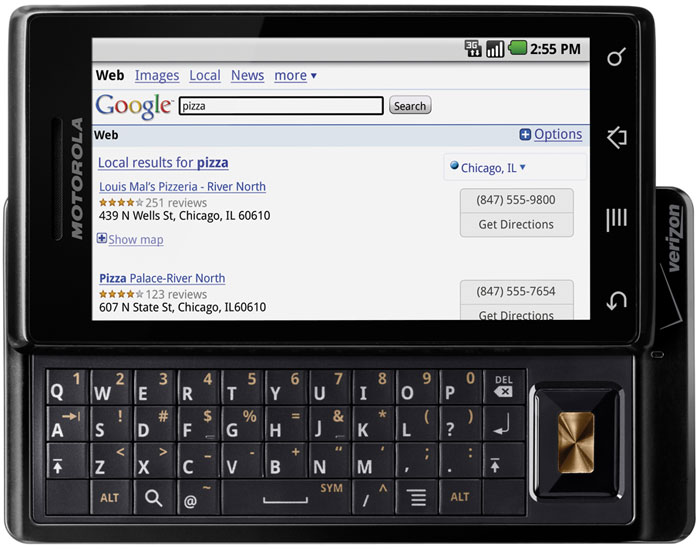
DROID by Motorola

Featuring high-speed Web browsing, voice-activated search, a customizable large screen, plus access to thousands of applications and hundreds of widgets through the Android Market, the new Droid device will arrive on Nov. 6.

The Droid is the first device Motorola is bringing to market under its strategic partnership with Google (Nasdaq:GOOGle), noted John Stratton, executive vice president and chief marketing officer at Verizon Wireless.

Customers will have access to more than 12,000 applications, he said.

400,000 Pixels

Droid is one of the thinnest full-QWERTY slider phones available, claims Motorola. Features include location awareness, voice recognition and over-the-air updating.

Its 3.7-inch, high-resolution screen boasts a width of 854 pixels to reduce the need for side-to-side panning and more than 400,000 pixels total, significantly outstripping what's available on competitors -- including Apple's (Nasdaq: APPLE) iPhone.

A 5-megapixel camera comes loaded with dual-LED flash, AutoFocus and image stabilization; DVD-quality video capture and playback is also available. A 16-GB memory card is included.

Turn-by-Turn Voice Guidance

Voice-activated search, meanwhile, allows users to simply tell the device what they're looking for -- "gas station," for example -- and it will serve up Google search results based on their location. For more results, they can type in search terms, and Droid will search not only content on the Web, but also data residing on their phone -- apps and contacts, for example.

Then there's Droid's Google Maps Navigation feature -- now in beta -- which provides turn-by-turn voice guidance as a free feature of Google Maps. Powered by Google, the Web app lets users give voice shortcuts such as simply saying, "Navigate to [some destination]," generating turn-by-turn directions along with Street View and satellite imagery.

Droid is the first device to offer Google Maps Navigation, Motorola and Verizon said.

'A Big Benefit'

Such capabilities are "a big benefit when in a vehicle," Chris Hazelton, research director for mobile and wireless with the 451 Group, told LinuxInsider.

"Instead of typing in a search, you speak one command and there's already a function for it, so it runs through several processes to give you your results," he explained.

Most other devices, by contrast, require that the user open up a specific application first -- and "by that time you may have missed your exit," Hazelton added.

Such functionality is also particularly important as more states go hands-free, he noted. "There's a need to limit the time people spend looking at the screens of their smartphones, and one very good way of doing that is voice control," he said.

Support for Exchange

The Droid announcement came just one day after the release of support for Android 2.0 -- also known as "Eclair" -- in the platform's software development kit. Droid taps several features new to that version.

Another notable example is its support for Microsoft (Nasdaq: MSFT) Exchange, which is included along with integrated Gmail.

"This device will be somewhat like the iPhone in that employees or prosumers can bring it to work easily, because as long as their company has Exchange, they can link directly to their work email," Hazelton noted.

Equal Shares by 2014

Whether the device can truly compete with the iPhone, of course, is the multimillion-dollar question.

"We expect a whole bunch of new Android phones to come out next year," Allen Nogee, principal analyst with In-Stat, told LinuxInsider. "Over time, by about 2014, I see the Android and Apple having about equal market share."

Yet the two platforms will account for those shares in very different ways, Nogee noted.

'Coming at a Good Time'

"Apple still focuses all its energy on one phone -- maybe by then it will be two or three, but it won't be hundreds," he predicted.

Android, meanwhile, will be available in many, many different flavors and models, representing a variety of manufacturers.

Several competing mobile operating systems, however -- such as RIM OS and Windows Mobile -- are "kind of floundering and trying to find their way," Nogee noted.

As a result, "Android is coming at a good time," he concluded.

'Great Potential'

"When the iPhone was introduced, it supercharged the smartphone segment," telecom analyst Jeff Kagan told LinuxInsider. "Then we saw several other good competitors, and the race was on."

Now, with Google in the picture, "we are expecting another giant leap forward," Kagan noted. "Will it happen? That is the question we are all asking."

The first version was "good, but not great," he said. "Will the second version be great?"

In the last few years, "we have seen as many flops as successes," Kagan pointed out. "So we should wait to draw opinions until we can see and use this device."